Network Drive
As an employee at DTU, you can use the network drive - commonly referred to as the O-drive - to store and share data. Folders are managed via DTUBase Lists in DTU Basen, where access rights are adjusted - either for you alone or for sharing with selected colleagues across DTU. The unit’s DTU Base administrator grants you access to the main folders. You can create subfolders yourself.
Each unit has its own unit folder (e.g., AIT), where you have access to the unit’s shared files/documents, etc.
Each unit has its own unit folder (e.g., AIT), where you have access to the unit’s shared files/documents, etc.
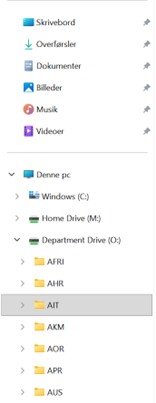
In the unit folder, there is a main folder called Public and a main folder called Intern.
Public:
In the Public main folder, you get access to specific subfolders, which are not available to everyone in the unit. This makes it possible to control access. Here you can store material that several collaborating units need access to.
Intern:
In the Intern subfolder, all files can be accessed by employees in your unit. You cannot share files with people outside your unit.

If you have problems accessing a specific folder on the O-drive, you should contact IT support.
The O-drive is part of DTU’s internal servers and can be accessed via File Explorer when you are logged into DTU’s network:
- Log in to DTU’s network.
- Open File Explorer via the Start button.
- Click This PC on the left side.
- Select the O-drive under network drives in the left menu.