Data storage and sharing
At DTU, we store and share data across several platforms: our document management system DTUDOCX, SharePoint (including Microsoft Teams), network drives (the O-drive), and OneDrive. Each platform has its strengths depending on the nature of your work.
When saving and sharing data, you must consider personal and sensitive information (GDPR) and comply with DTU’s guidelines for information security and cybersecurity. This means choosing the appropriate platform and ensuring that only relevant individuals have access.
If you’ve accidentally deleted a file, you can restore it using AvePoint ReCenter, which allows you to recover documents, folders, and files:
- Go to AvePoint ReCenter
- Log in with your DTU credentials
- Select the service you want to restore from:

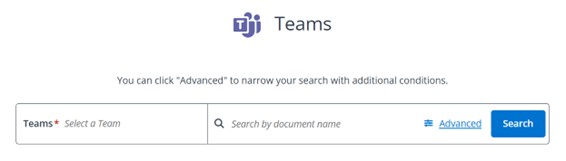
- Use the search function (see the example from Teams). Click on Advanced to perform an advanced search: